Building Stable Docker Images for GenAI and ML Workflows
A step by step guide for building stable production ready docker images for ML workloads

Building Stable Docker Images for GenAI and ML Workflows
Although Docker seems to be falling out of “developer love” in favour of Podman or other tools, I do not personally believe the technology will be phased out unless the Docker guys come with more surprises.
I have seen many ways of building images, and the internet is full of tutorials on how to build a Docker image, mostly based on the Alpine distribution due to its minimal footprint. I cannot state how much this is a bad practice and this is one of the reasons I am writing this article. It might work for deploying basic stuff, which most of these tutorials do, but when stability and performance are required to run a Python or Nodejs application they fail in so many spectacular ways.
Will start with the question why Docker? The answer is simple, it creates a consistent environment (both in the cloud as on your own machine) your application will run on. This is crucial if you want to have a consistent development <-> deployment lifecycle.
2nd question How would a production grade image build, which you can integrate in your own CI/CD pipelines would look like?
The answer to this one is more nuanced but it should have the following requirements:
- Be secure. This is a must when deploying production systems. You won’t want your application to be a hacker playground day 0, and yet this happens more than one would expect these days. Your base image must have rolling security updates provided, and patches for major identified CVEs.
- Have an up-to-date python version. If your company or specific python modules will still require an older python version that should be preferably > 3.11.x
- Have up to date dependencies. A base image having a good access to a larger number of libraries will make things easier if modules might need to be compiled from source.
- Be stable. You want your image builds to have the same dependencies and libraries, otherwise your application will behave randomly or in some cases crash all-together.
Specifically for python we will follow this sandwich recipe:
- A base image that has pinned package dependencies. Packages in python tend to be very active. They also follow a semantic versioning in most of the cases. We want the image to contain the same module versions each time we built it.
Don’t do this:
pip install google-cloud-secret-manager<- this will install always the latest available version, which in most of the cases won’t be what you want. Do this in the requirements.txt file, specifying thepip install google-cloud-secret-manager==2.24.0 - Instead of creating a virtual environment for python packages, we will copy the application files directly in the mluser home folder, making the app deployment a breeze in a whooping 1 - 2 seconds. As the base image already contains all the packages required for the application to work, the only step required is to add the files to the final image.
A visual aid of the above process, and check the repo cloudrun-python-image where the dockerfile execution steps are properly documented as well.

When built right, i.e. using multi-stage builds, on debian or ubuntu slim images, most of the extra space is taken by the python modules required by the application to run.
To demonstrate this, the screenshots of a docker container running from the base CloudRun python image:


Security of the image
The base image has a single medium severity vulnerability as of 09.09.2025.

This still remains the case after adding the python packages required to run the application.

The application itself runs under mluser, which is an unprivileged user with no sudo rights as shown in the image bellow. This will enhance the security posture of your application, as most of the docker images I’v seen run as root with full privileges. 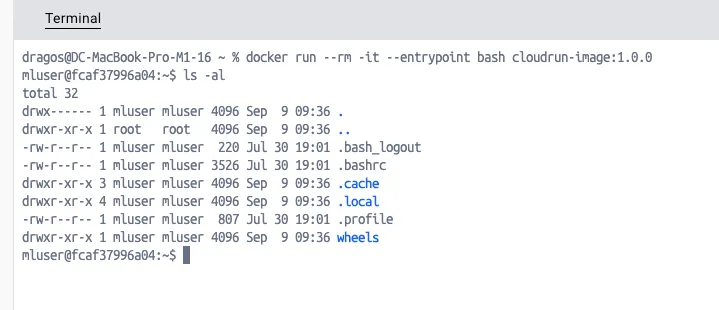 For even a better security posture, re-build your base image at least every month and check its vulnerability exposure. Good tools I use are either Docker Scout or Google Cloud container scanning.
Link to the Github repository containing the base CloudRun image.